
From LLM to Agent: Why Token-In-Token-Out Is Not Enough
Published:
Table of Contents
- The Fundamental Limitation: Stateless Text Generation
- RAG: Giving the Model Knowledge It Doesn’t Have
- Tool Use: From Talking to Doing
- MCP: A Standard Interface for Tools
- Deep Dive: MCP in Action
- Skills: Reusable Task Patterns
- Deep Dive: Anatomy of a Skill
- The Agent: Putting It All Together
- Harness Engineering: The Invisible Layer
- The Full Stack
- What’s Next
Large Language Models are impressive. They can write code, summarize papers, and hold conversations that feel remarkably human. But once you move past the demo and try to build something real, you quickly hit a wall: an LLM, at its core, is just token-in, token-out. You give it text, it gives you text back. That’s it.
This post walks through the logical progression from a raw LLM to a full agent system — not as a glossary of buzzwords, but as a series of engineering problems and the solutions that emerged to address them.
The Fundamental Limitation: Stateless Text Generation
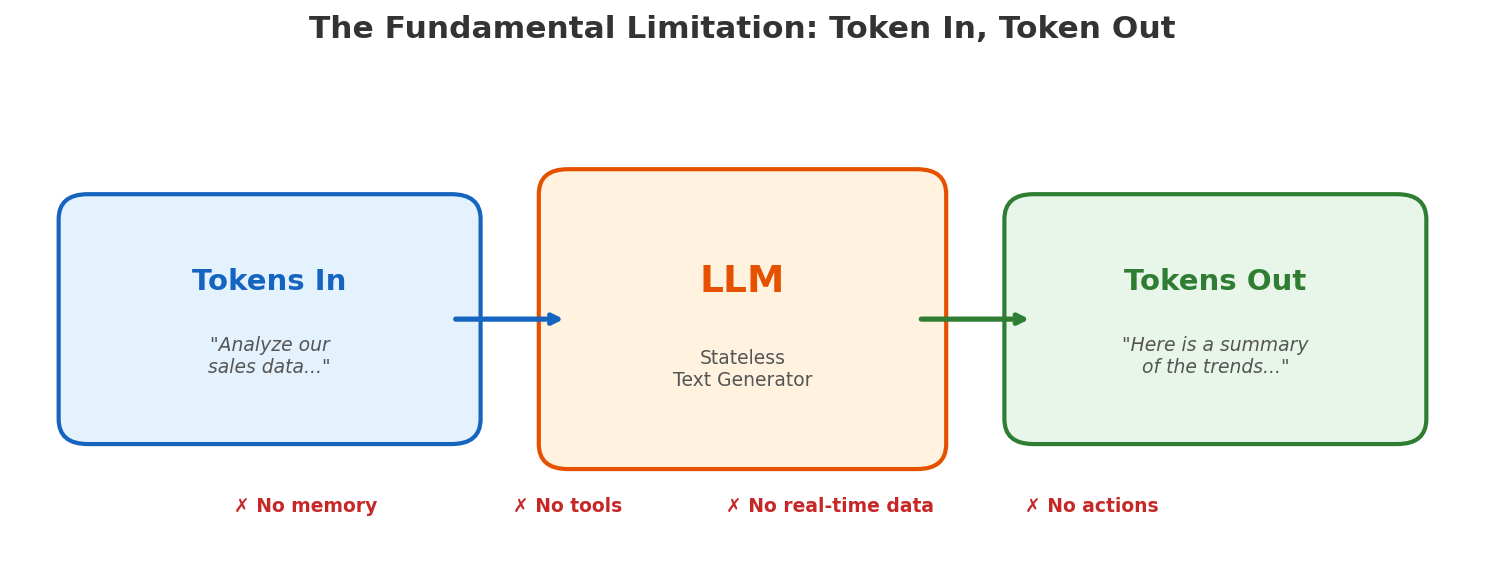
An LLM has no memory across calls. It cannot browse the web. It cannot run code. It cannot read your database. Every request starts from scratch — the model reads a prompt, produces a completion, and forgets everything.
This is fine for answering “what is the capital of France?” It is not fine for “analyze our sales data from last quarter, identify trends, and update the dashboard.” That task requires three things the LLM fundamentally lacks:
- Knowledge — it doesn’t have access to your sales data.
- Memory — it can’t maintain state across a multi-step workflow.
- Action — it can’t actually update a dashboard; it can only generate text about updating a dashboard.
The rest of this post is about how each of these gaps gets filled — and why each solution naturally leads to the next.
RAG: Giving the Model Knowledge It Doesn’t Have
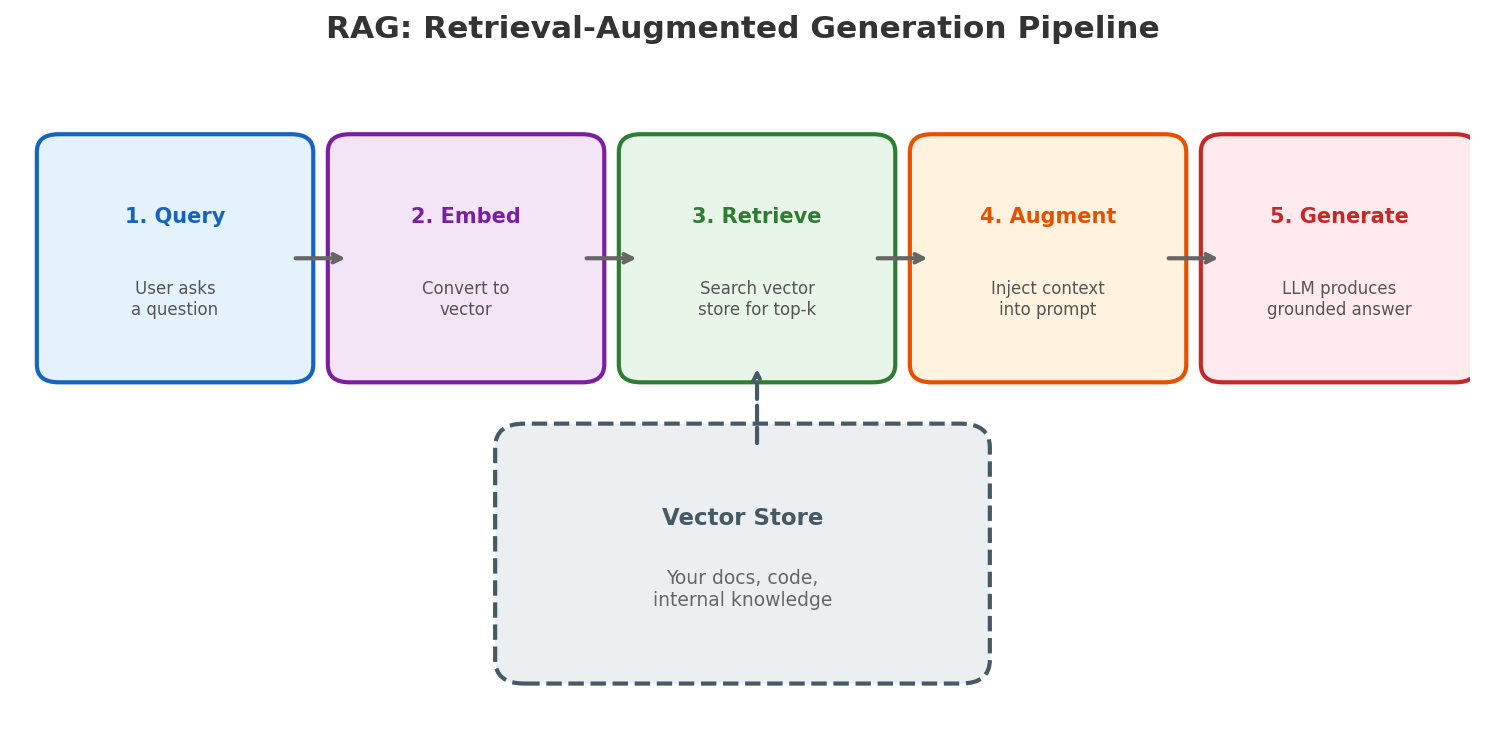
The first gap is knowledge. The model’s training has a cutoff date. It has never seen your internal docs, your codebase, or your Confluence pages.
The naive solution — fine-tuning — is expensive, slow, and goes stale. Retrieval-Augmented Generation (RAG) takes a different approach: instead of baking knowledge into the model’s weights, you retrieve relevant context at query time and inject it into the prompt.
The pipeline looks like this:
- Index your documents into a vector store (embeddings)
- Retrieve the top-k most relevant chunks for a given query
- Augment the prompt with those chunks
- Generate a response grounded in real data
RAG solves the knowledge gap. But the model still can’t do anything — it can now talk intelligently about your sales data, but it can’t update the dashboard. That requires the ability to take action.
Tool Use: From Talking to Doing
The next logical step: let the model call functions. Instead of only generating text, the model outputs structured tool calls — “search the database,” “send an email,” “create a JIRA ticket” — and a runtime executes them.
But wait — how does this actually work? The model is just generating text. It doesn’t have a terminal. It can’t run code. The answer: the model doesn’t execute anything itself. It outputs a structured request (essentially JSON saying “I want to call this function with these arguments”), and the system around it handles execution. This separation — the model decides, the system acts — is fundamental to everything that follows.
This is a significant shift. The model goes from being a text generator to being a decision-maker. But tool use alone introduces new problems:
- Who defines the tools? Someone has to write the function signatures, descriptions, and implementations.
- How does the model discover them? You can’t stuff hundreds of tool definitions into every prompt.
- How do tools from different systems interoperate? A Slack tool and a GitHub tool might be built by different teams with different interfaces.
This is where things used to get messy. Every AI application built its own tool integration layer, its own serialization format, its own error handling. Then MCP came along.
MCP: A Standard Interface for Tools
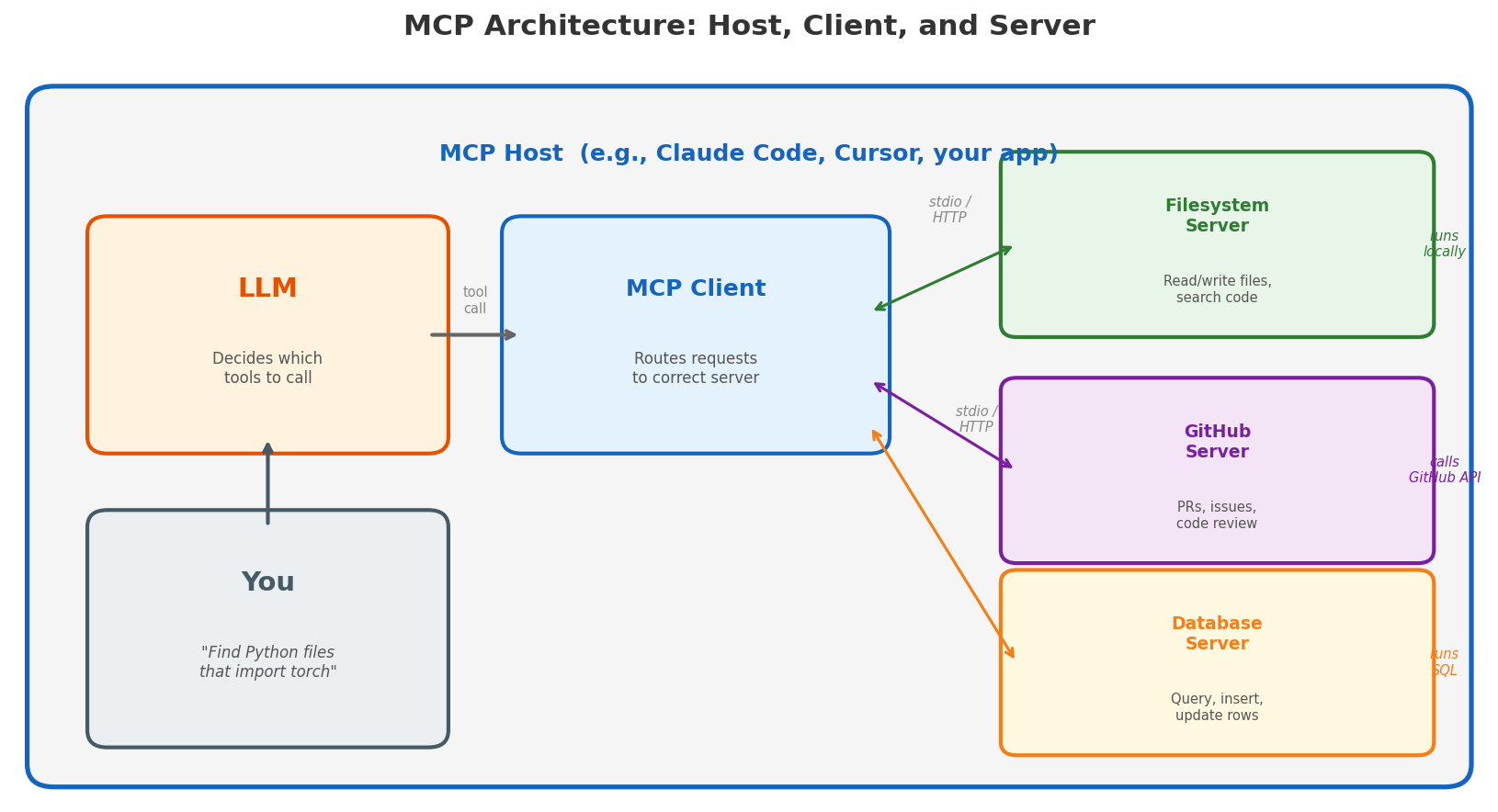
The Model Context Protocol (MCP) provides a standardized protocol for connecting LLMs to external tools and data sources — think of it as USB-C for AI. Before MCP, every integration was bespoke. Want to connect your model to GitHub? Write a custom adapter. Slack? Another adapter. Your internal API? Yet another one.
To understand MCP, you need to know three roles:
MCP Host — the application you’re using. This is Claude Code, Cursor, or any app that embeds an LLM. The host is what you interact with. It manages the LLM, the conversation, and the user experience.
MCP Client — a component inside the host that speaks the MCP protocol. When the LLM decides to call a tool, the client routes that request to the right server. One host can have multiple clients connected to multiple servers simultaneously.
MCP Server — a lightweight program that exposes tools and actually executes them. This is the key insight people miss: the MCP server is the execution layer. A filesystem server has access to your local files and can read, write, and search them. A GitHub server authenticates with the GitHub API and can create PRs, comment on issues, and review code. A database server connects to your database and runs queries. The LLM doesn’t need a terminal — the MCP server is the runtime.
Each server advertises what it can do through a standard discovery mechanism:
- Tools — actions the server can perform (e.g.,
search_files,create_issue) - Resources — data the server can provide (e.g., file contents, database rows)
- Prompts — reusable prompt templates
Why do people build MCP servers? The motivation is straightforward: if you want your service to be usable by AI agents, you write an MCP server. Before MCP, every AI tool had to write a bespoke integration for every service it wanted to connect to — M agents × N services = M×N integrations. With MCP, each service implements the protocol once (N servers), each agent implements the protocol once (M clients), and everything just works: M+N instead of M×N. It’s the same economics that made USB successful — standardization creates an ecosystem.
Today there are MCP servers for GitHub, Slack, PostgreSQL, Google Drive, Jira, and hundreds of other services. Any MCP-compatible agent can use any of them without custom code.
Deep Dive: MCP in Action
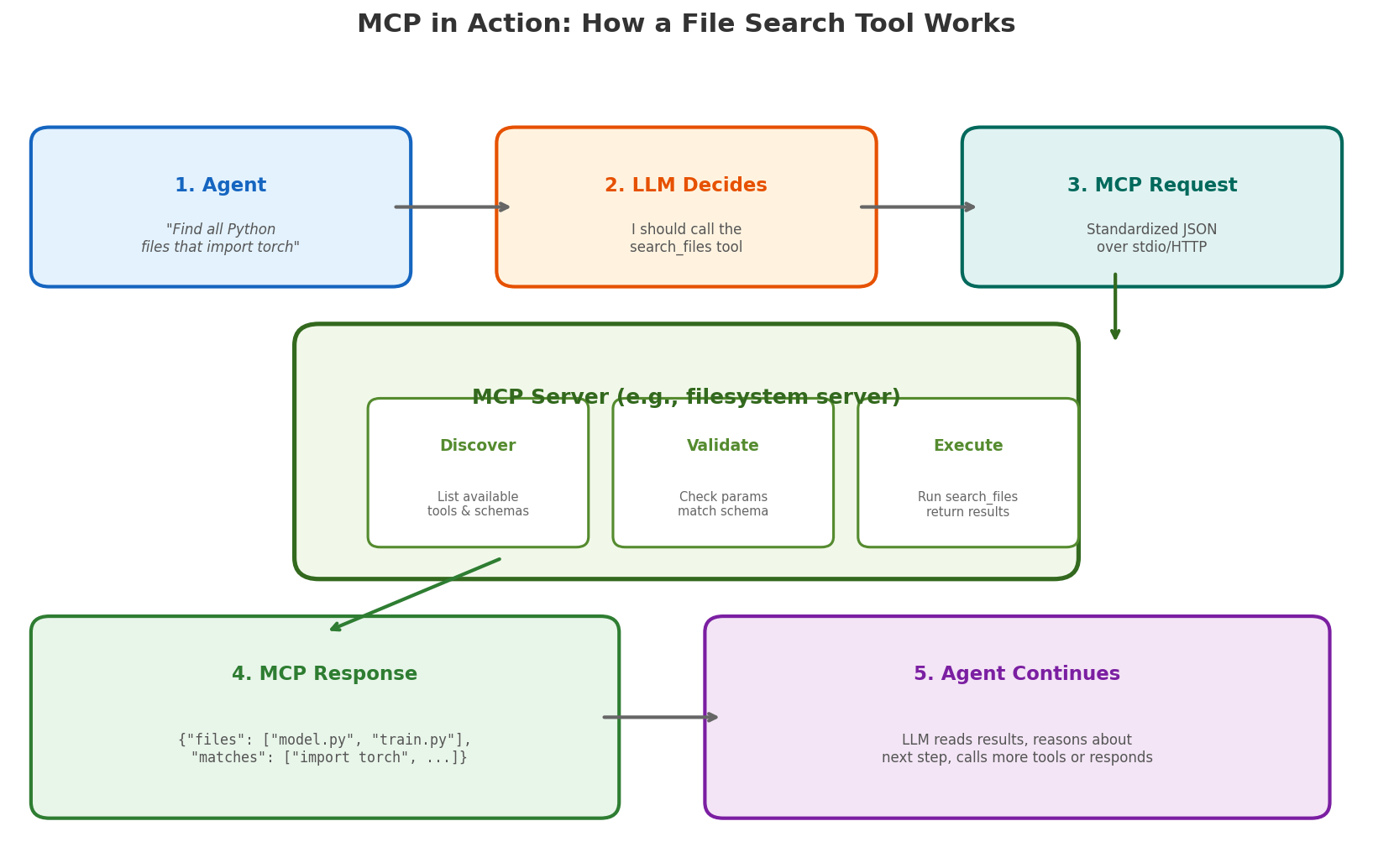
Let’s trace through a concrete example. Suppose you ask an AI coding assistant: “Find all Python files that import torch.”
Step 1: The host receives your request and passes it to the LLM, along with tool descriptions from all connected MCP servers. The filesystem server has advertised a tool called search_files with parameters query (string) and pattern (glob pattern).
Step 2: The LLM decides it needs to call search_files. It doesn’t run anything — it just outputs a structured JSON tool call:
{
  "tool": "search_files",
  "parameters": {
    "query": "import torch",
    "pattern": "**/*.py"
  }
}
Step 3: The MCP client routes this request to the filesystem MCP server over stdio (if the server runs locally as a subprocess) or HTTP (if it runs remotely). The protocol is the same either way.
Step 4: The MCP server does the actual work. It’s a real program running on your machine (or a remote server) with real filesystem access. It validates the parameters against its schema, runs the file search (e.g., using ripgrep or glob under the hood), and returns a structured response:
{
  "results": [
    {"file": "model.py", "line": 3, "content": "import torch"},
    {"file": "train.py", "line": 1, "content": "import torch.nn as nn"}
  ]
}
Step 5: The host feeds this result back to the LLM, which can now reason about it — read those files, answer your question, or call another tool.
Notice what happened: the LLM never touched the filesystem. It made a decision (“I should search for files”), expressed it as structured data, and a real program executed the action. This is how tool use works in practice — the model decides, the infrastructure acts.
Skills: Reusable Task Patterns
Now we have an LLM that can access knowledge (RAG) and take actions (tools via MCP). But there’s a reliability problem.
Even with tools available, you often find the model repeating the same multi-step patterns. “Read the file, understand the context, make the edit, run the tests” — this sequence appears in almost every code modification task. Sometimes the model gets it right. Sometimes it skips a step, forgets to run tests, or takes a destructive shortcut.
Skills are pre-defined task patterns that encode proven workflows. Instead of hoping the model figures out the right sequence of tool calls every time, a skill provides a structured recipe:
- What context to gather first
- What tools to use and in what order
- What constraints to follow
- How to validate the result
Skills sit between the raw tool layer and the high-level user intent. They’re not rigid scripts — the model still makes decisions within the skill — but they provide enough structure to make outcomes reliable and repeatable.
Deep Dive: Anatomy of a Skill
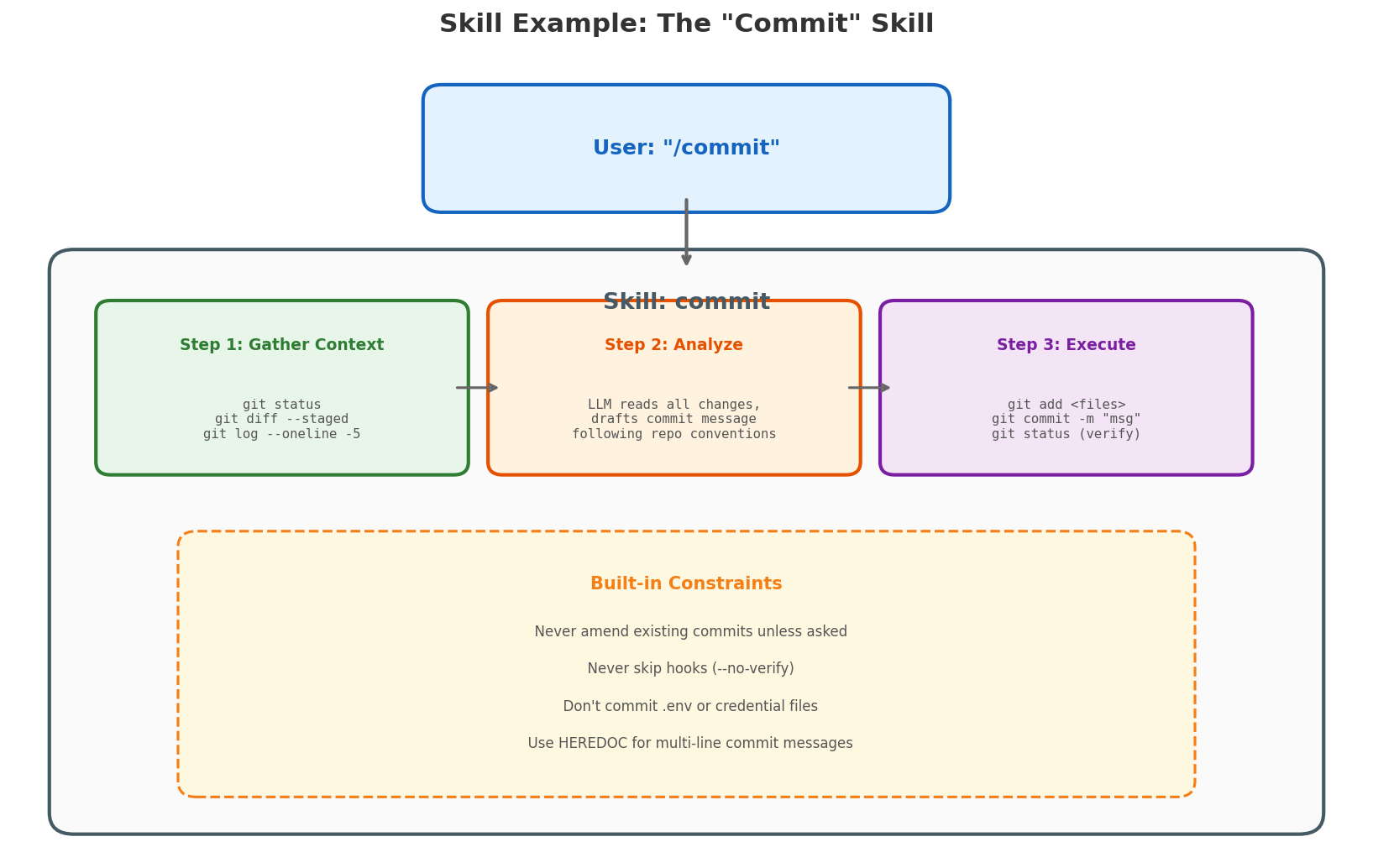
Let’s look at a concrete skill: commit — what happens when you type /commit in an AI coding assistant.
Without a skill, the model would have to figure out from scratch: What files changed? Should I stage them? What commit message convention does this repo use? Should I amend or create new? It might get it right, or it might git add -A and commit your .env file.
The commit skill encodes the right process:
Step 1: Gather Context — The skill instructs the agent to run three commands in parallel:
git status— see what’s changedgit diff --staged— see what’s already stagedgit log --oneline -5— see recent commit messages for style
Step 2: Analyze — The LLM reads all the gathered context and makes decisions:
- Which files to stage (specific files, not
git add -A) - What commit message to write (matching the repo’s existing style)
- Whether anything looks suspicious (credentials, large binaries)
Step 3: Execute — The agent runs the git commands:
git add <specific files>git commit -m "message"git statusto verify success
Built-in Constraints — The skill also encodes safety rules:
- Never amend an existing commit unless explicitly asked
- Never use
--no-verifyto skip hooks - Never commit files that look like secrets
- If a pre-commit hook fails, fix the issue and create a new commit (don’t
--amendthe previous one)
This is the difference between a skill and a raw prompt. The prompt says “commit my changes.” The skill says “here’s exactly how to commit changes safely, with guardrails, following the conventions of this specific repository.” The model still makes judgment calls — what to name the commit, which files to include — but within a structured, safe framework.
The Agent: Putting It All Together
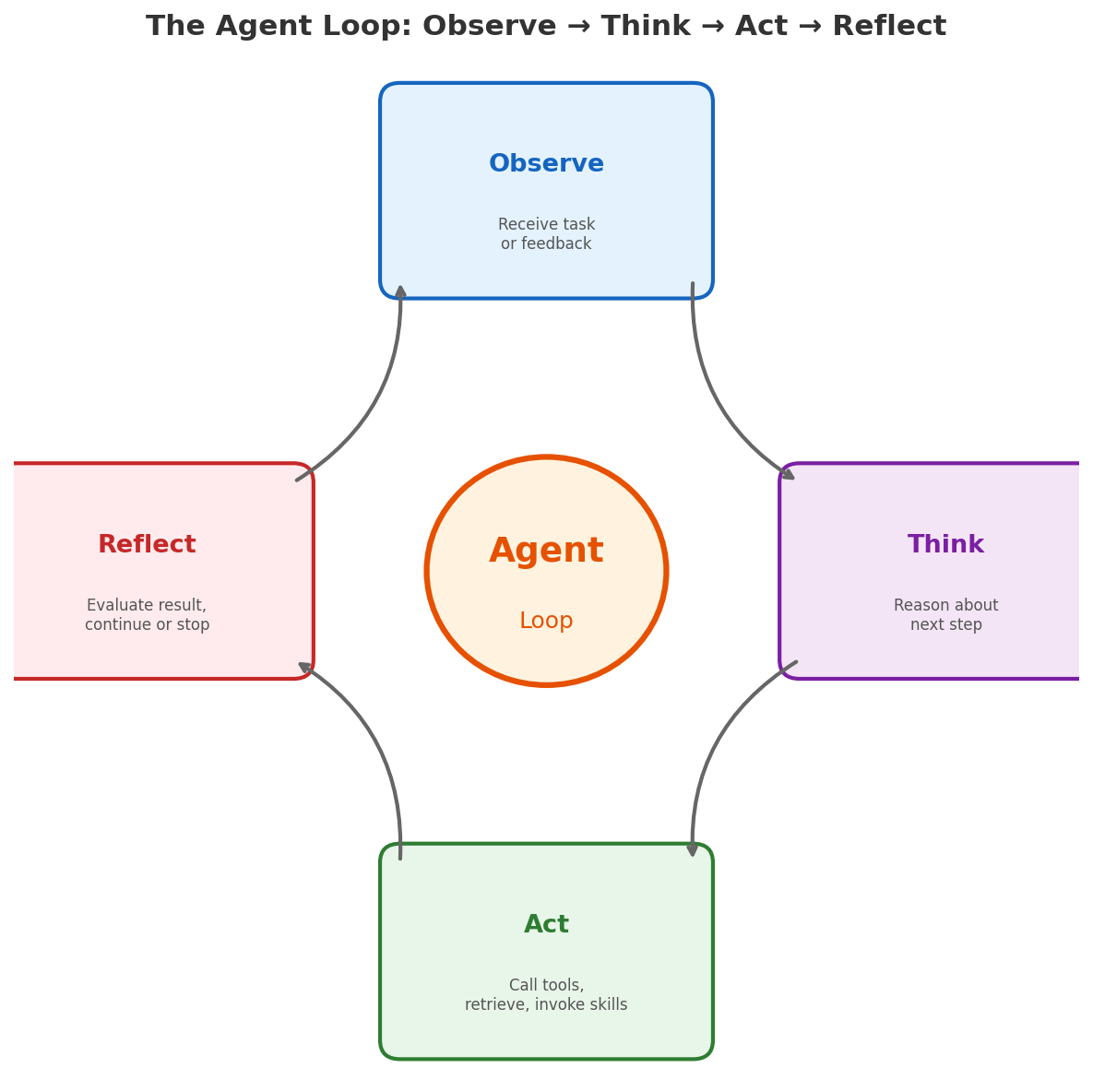
Now we have all the pieces: an LLM that can reason, RAG for knowledge, tools for action, MCP for standardized integration, and skills for reliable patterns. An agent is the runtime that orchestrates all of this in a loop:
- Observe — receive a task or user message
- Think — reason about what to do next
- Act — call a tool, retrieve context, or invoke a skill
- Reflect — evaluate the result and decide whether to continue
This observe-think-act loop is what transforms a stateless text generator into something that can actually accomplish multi-step tasks. The agent maintains state across iterations, recovers from errors, and makes progress toward a goal.
But the agent loop itself doesn’t solve everything. Who manages the context window when the conversation gets too long? Who decides which tool calls need user approval? Who prevents the agent from running in an infinite loop? That’s the job of the harness.
Harness Engineering: The Invisible Layer
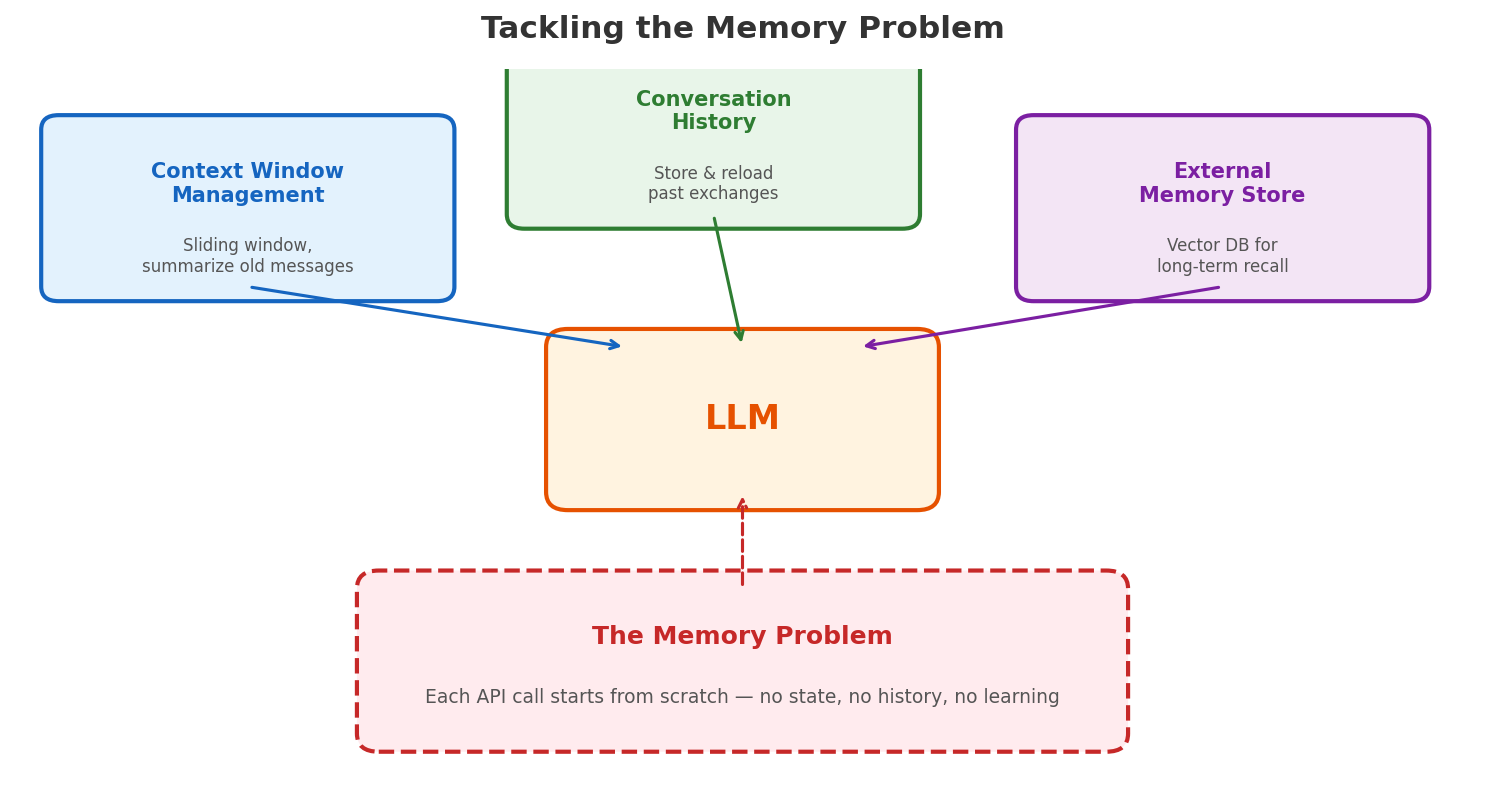
Here’s what most blog posts leave out: the agent doesn’t run in a vacuum. There is a layer of engineering between the model and the user that makes everything work — the harness.
Remember the three limitations we identified at the start? Knowledge, memory, and action. RAG solved knowledge. Tools and MCP solved action. But memory — the ability to maintain context across a long session, remember user preferences, and learn from past interactions — that’s the harness’s job.
The harness tackles memory at three levels:
Context window management — The LLM’s context window (e.g., 128K or 200K tokens) is its “working memory.” As a conversation grows, the harness must decide what to keep and what to drop. It uses sliding windows, summarization, and compression to fit the most relevant information into the available space. This is why long coding sessions sometimes feel like the model “forgot” what it was doing — it literally did, because the harness compressed away earlier context to make room.
Conversation history — Rather than keeping everything in the context window, the harness can persist conversation history externally and selectively reload relevant parts. Think of the context window as a small desk and the history as a filing cabinet — the harness decides which files to pull out for the current task.
Persistent memory — For true long-term recall — user preferences, project conventions, past decisions — the harness writes to and reads from external stores. This could be a structured memory file (like
MEMORY.mdthat persists across sessions), a vector database, or a knowledge graph. When people say an AI “remembers” something, there’s always a system like this behind it. Memory is not a feature of the LLM; it’s a feature of the harness.
But memory management is just one of the harness’s responsibilities:
- Permission enforcement — deciding which tool calls to auto-approve vs. prompt the user (reading a file is fine; deleting a branch needs confirmation)
- Error handling — retrying failed tool calls, catching malformed outputs, preventing infinite loops
- Hooks — letting users inject custom behaviors at specific points (run linting before commit, send a notification after deployment)
- Cost and latency control — deciding when to use a more capable model vs. a faster one
This is where the real engineering complexity lives. The model is the brain, but the harness is the nervous system. A brilliant model with a poor harness produces unreliable results. A well-engineered harness can make even a less capable model useful.
Think of it this way: when you use an AI coding assistant, the quality of your experience depends less on whether the underlying model scores 92% vs. 95% on some benchmark, and more on whether the harness correctly manages context, prevents destructive actions, and maintains state across a long session.
The Full Stack
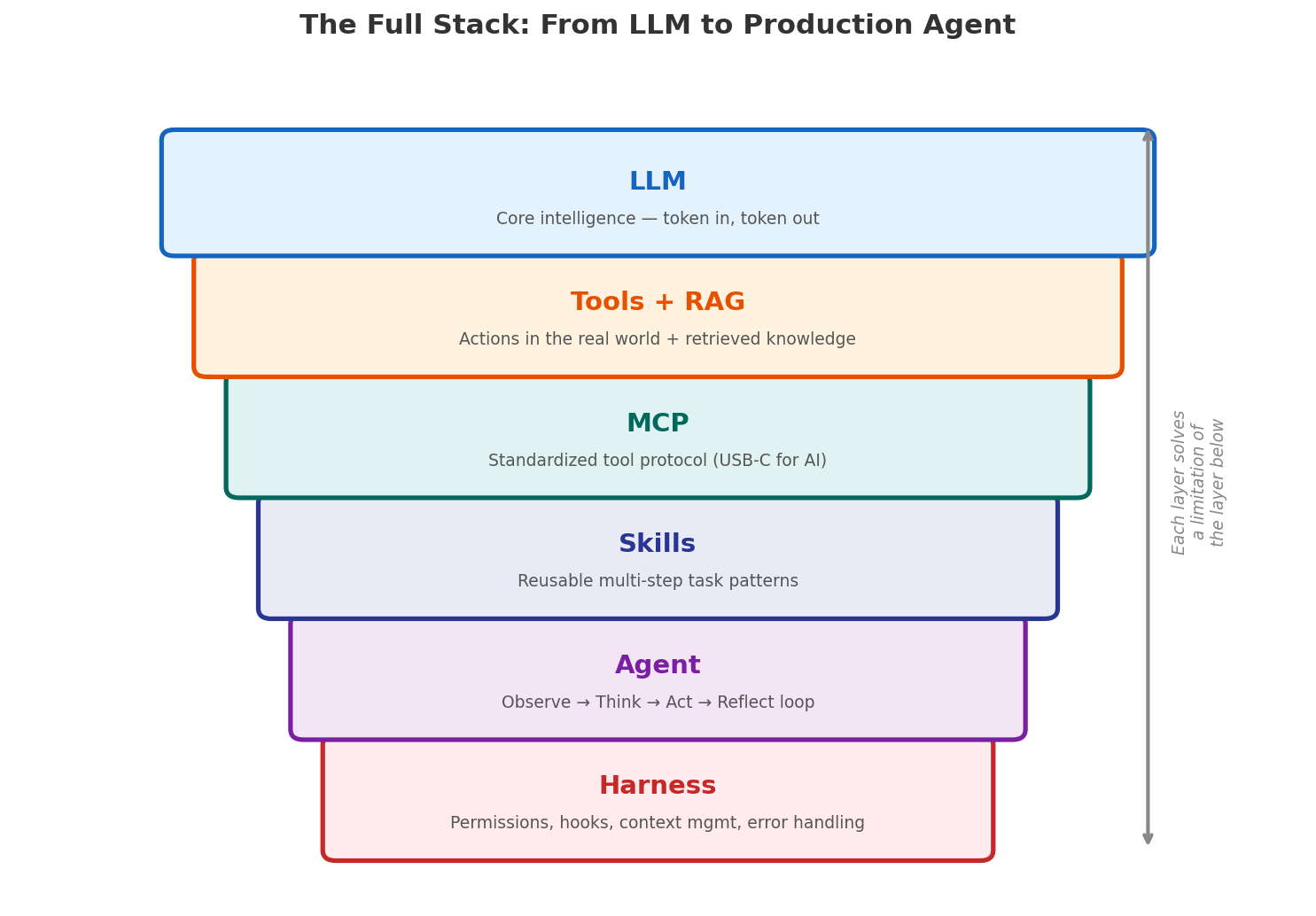
Zooming out, here is the logical stack from bottom to top:
| Layer | What It Does | Which Gap It Fills |
|---|---|---|
| LLM | Generates text, reasons about problems | Core intelligence — but stateless, no knowledge, no actions |
| RAG | Retrieves relevant context at query time | Knowledge gap — the model can’t know everything |
| Tools | Executes actions in the real world | Action gap — text generation alone isn’t enough |
| MCP | Standardizes tool interfaces (host/client/server) | Scale gap — bespoke integrations don’t scale |
| Skills | Encodes reusable multi-step task patterns | Reliability gap — ad-hoc tool use is error-prone |
| Agent | Orchestrates the observe-think-act loop | Complexity gap — multi-step tasks need state |
| Harness | Manages memory, permissions, errors, hooks | Production gap — real systems need guardrails and memory |
Each layer exists because the layer below it is not sufficient on its own. That’s the key insight — this isn’t a collection of trendy acronyms. It’s a logical chain where each link addresses a real limitation of the previous one.
What’s Next
We are still early. Current agents are good at well-scoped tasks but struggle with truly open-ended, long-horizon work. The harness layer is where most of the innovation is happening now — better memory, smarter context management, more sophisticated planning.
But the direction is clear: we’re moving from “ask the model a question” to “give the agent a goal.” The gap between those two is filled with engineering, and understanding each layer is the first step to building systems that actually work.
Last updated: March 25, 2026